Typing every supplier bill from GSTR-2A or 2B into Tally takes hours, and one wrong GSTIN or tax rate spoils your GST reports. With QuikAccount you download 2A / 2B straight from the GST portal into Excel, map your GST ledgers once and post every bill to TallyPrime as a purchase voucher. New suppliers are created for you, with the address taken from their GSTIN.
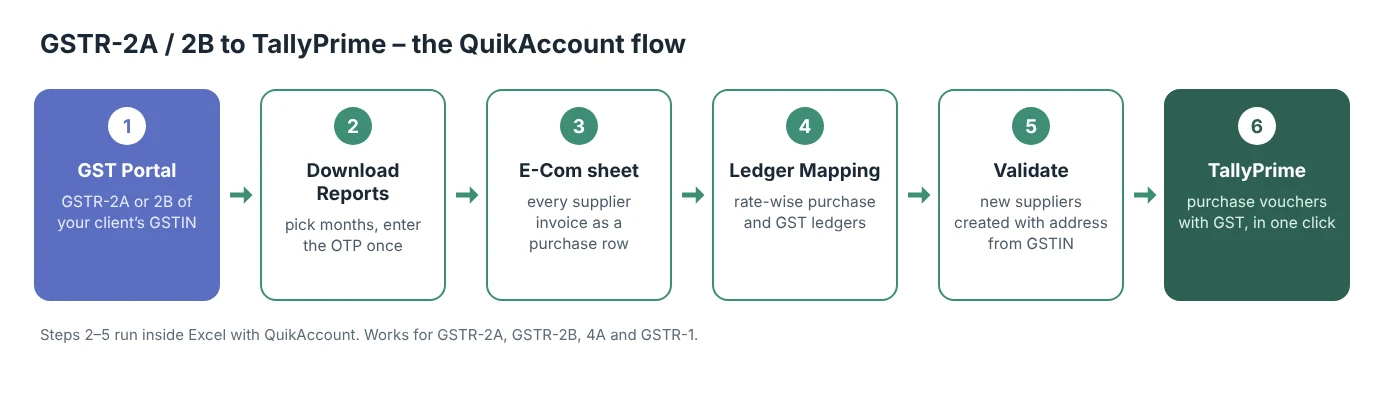
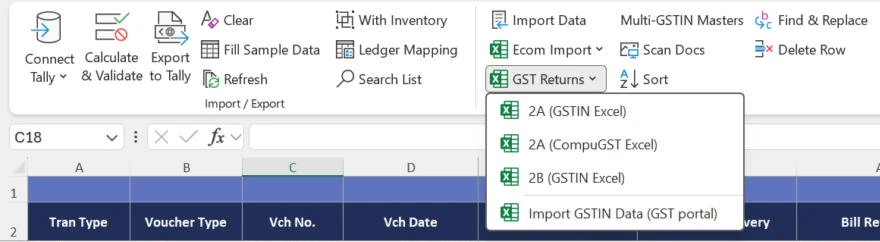
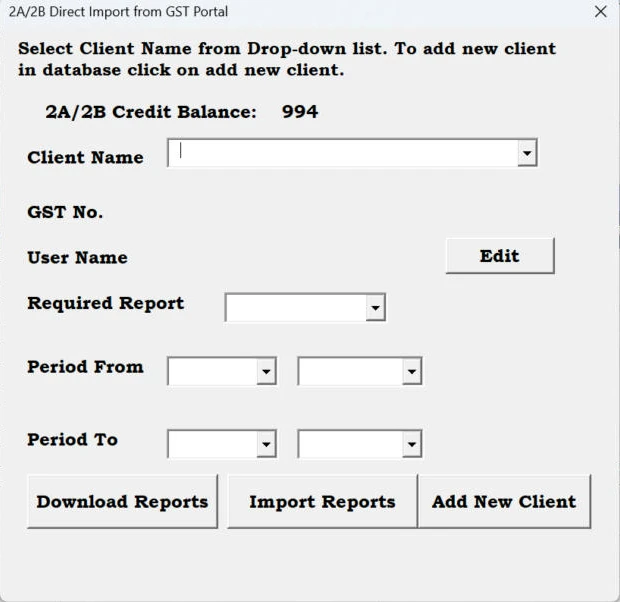
In short: Connect Tally → GST Returns ▾ > Import GSTIN Data on the E-Com sheet → Download Reports (OTP) → Import Reports → Ledger Mapping → Calculate & Validate → Export to Tally.
Download Free TrialBook a Free Demo on WhatsApp
Need help? Call or WhatsApp +91 93584 44502. Free installation and demo support.
Some suppliers (banks, telecom and airline companies) bill you from more than one state, so one supplier name comes with two GSTINs. TallyPrime then lists those purchase vouchers under conflicts in party GST registration details in its GST reports.
Downloaded the file yourself from the GST portal or from CompuGST? Skip the direct download – no GST API credit is used:
| Message | What to do |
|---|---|
| Please login at GST portal and enable API access first. | On the GST portal go to My Profile > Manage API Access, choose Yes and a duration, then download again. |
| OTP not received | The OTP goes to the mobile number and e-mail registered on the GST portal for that GSTIN, not to your QuikAccount number. |
| A month shows Failed | Run Download Reports again for that month. Months already downloaded are not charged again. |
| Date … is not within the financial year selected | Select the right Financial Year on the Registration sheet. Period From and Period To must be in the same financial year. |
| Validation Failed – new ledgers have been transferred to Ledger sheet | Export the new suppliers from the LedgerCreation sheet, then validate again. |
| In trial version you can not process more than 50 entries at a time | Export in batches of 50, or buy the licence. |
No. TallyPrime can load GSTR-2A / 2B to reconcile it with the purchases you have already entered, but it does not create the purchase vouchers for you. QuikAccount downloads the return, creates the missing suppliers and posts the bills as purchase vouchers. To compare 2A / 2B with your books, see GSTR-2B reconciliation with Tally.
GSTR-2B is a fixed monthly statement of the input tax credit available to you, so most businesses book purchases from 2B. GSTR-2A keeps changing as suppliers file or amend their returns. QuikAccount imports both – choose the one you reconcile your input tax credit with.
Yes. Choose R1 as the Required Report to bring your GSTR-1 sales into the sheet. For an XML file, answer No when Export to Tally asks about sending data to Tally; the file filexml.xml is in the Software Folder (Registration tab). Import it in Tally with Import → Transactions.

Every supplier bill in GSTR-2A / 2B comes straight from the GST portal.
New supplier ledgers get address, state, PIN and registration type from the GSTIN.
Map local and interstate purchase, CGST, SGST and IGST ledgers once and reuse the mapping.
Pick a period of several months; the OTP is asked once per run.
Validate shows missing ledgers, wrong dates and other errors before anything reaches Tally.
Post purchases from 2A / 2B / 4A, or sales from your own GSTR-1.

10,000
25,15,40,200
105
For Utility, Support and Service


Great software, User friendly & Superb support. All GST reports show accurate results. Multiple formats for each voucher to suit our needs. Whatever format of data you have, you can export it to Tally. Good job, QuikAccount team!

The software is user-friendly. It provides a lot of options to cater to your needs and gives results in desired format. It also asks for minimum data and most of the fields are either auto-calculated or imported from Tally, which makes working on this software much faster.

Superb tool to integrate Excel data with Tally. We have imported complex e-commerce reports with this tool and it imported large data accurately and very fast. The company provides a one-click import option for multiple e-commerce platforms.
Share your details and we will get back to you.